Meeting notes for the meeting at the table
Live transcript by speaker, then a summary, decisions and action items — from the phone in the middle of the room.
Download on the App Store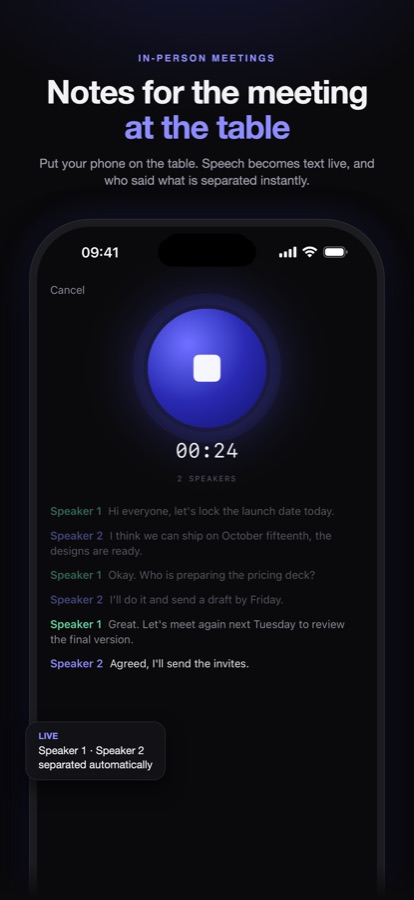
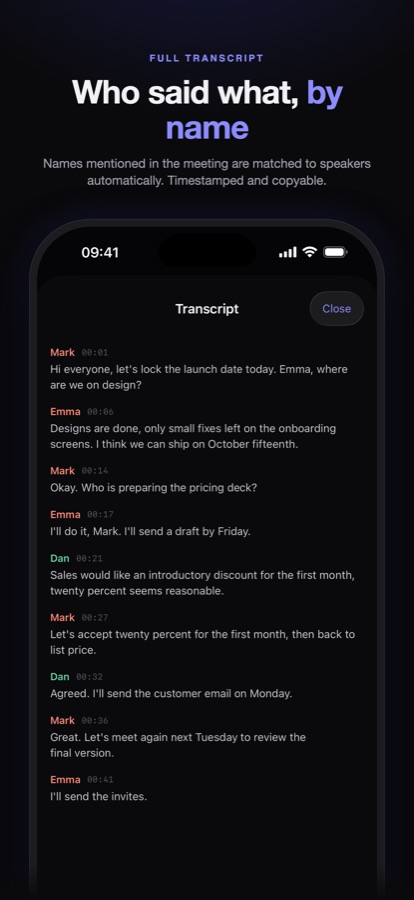
Most AI note-takers were built for video calls: a bot joins Zoom or Teams and records from there. That does nothing for the meeting that happens around a table, the client visit, the lecture hall or the interview in a café. Transcribe: AI Meeting Notes is for those rooms. You put your iPhone in the middle, tap record, and the transcript appears as people talk, already split by speaker.
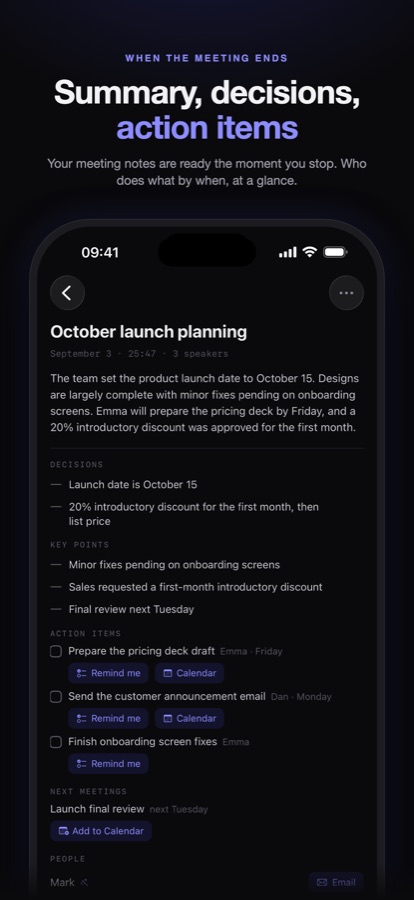
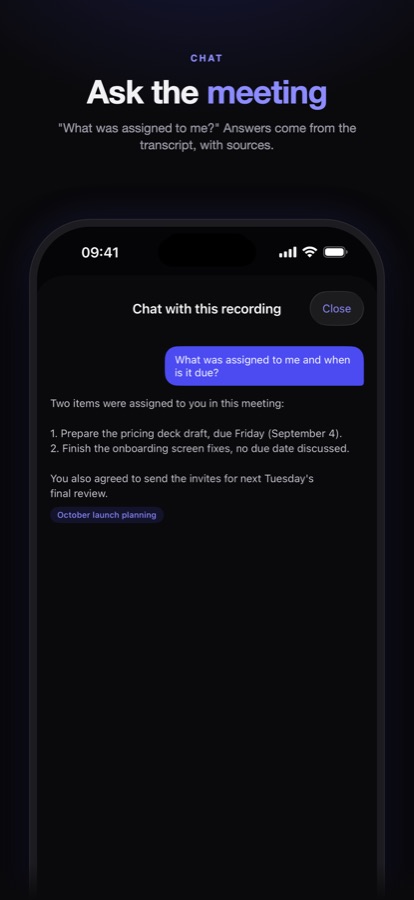
When you stop, the notes are ready: a short summary, the decisions stated plainly, action items with an owner and a due date, and the full transcript underneath with timestamps so you can check every line. Ask the meeting a question — “What was assigned to me?” — and the answer points to the line it rests on.
2026 is the year recording consent stopped being a footnote. Courts in California let the core wiretap claims against Otter.ai proceed in August, a second suit targets a note-taker that records without joining the call, and the EU AI Act's transparency rules apply since 2 August 2026. The app does not hide anything from the room: it is a phone on the table, and our articles below explain when you need everyone's consent and how to ask for it.
There is no sign-up and no account. Audio is streamed to Soniox for transcription and the transcript goes to Google Gemini for the summary and chat; the app does not keep the audio file, and your transcripts and summaries are stored on your iPhone.
What the app does
Live transcript, split by speaker
Speech becomes text while people talk, labelled Speaker 1, Speaker 2 and so on. When people address each other by name, the labels pick it up. Name a voice once and it is recognised in later meetings; voiceprints stay on the iPhone.
Summary, decisions, action items
When you stop, you get a short summary, the decisions, action items with owner and due date, key points and follow-up meetings — with the full timestamped transcript underneath.
Ask the meeting
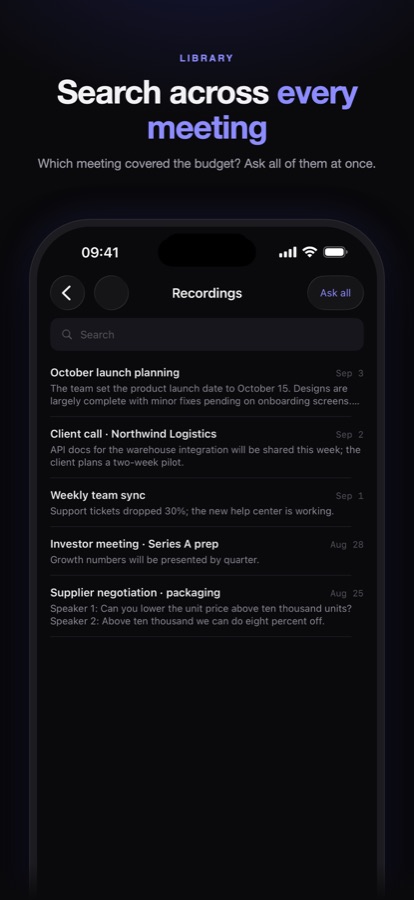
Ask “Why did we move the deadline?” and the answer cites the transcript line it is based on. You can also ask across all your meetings and search the whole library.
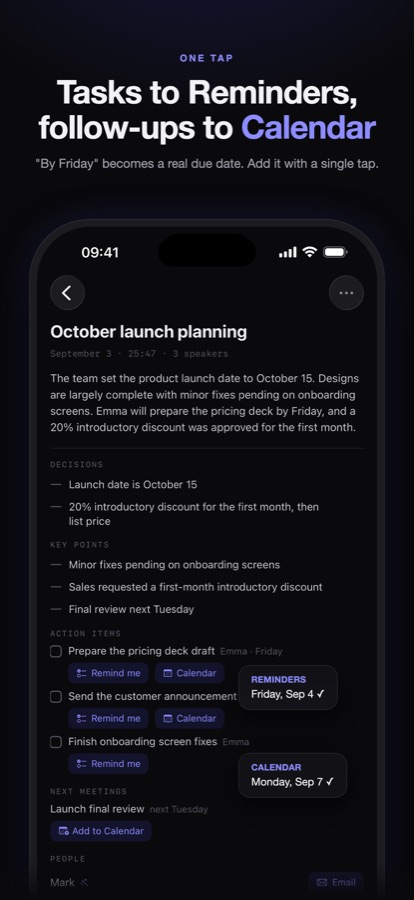
Straight into Reminders and Calendar
Action items go to Reminders in one tap with their due date; follow-up meetings become Calendar events.
Share the way people read
Copy the text, share a .txt file or PDF, export subtitles as .srt, or email each participant their part.
Keeps recording with the screen off
Recording continues in the background, visible on the Lock Screen and in the Dynamic Island. Start and stop from Apple Watch or the Home Screen widget.
60 languages, detected automatically
Transcribes 60 languages and detects the language on its own. The app interface is available in English, Turkish, German, French, Spanish, Italian, Dutch, Portuguese, Russian and Arabic.
Articles
AI Notetaker Lawsuits in 2026: What the Otter and Granola Cases Mean for Your Meetings
In August 2026 a judge let the core wiretap claims against Otter.ai proceed; Granola was sued in July. What happened, what is still open, and what to change.
Transcribing Bilingual Meetings: What Happens When Speakers Switch Languages
Code-switching can multiply transcription errors several times over. What 2025–2026 benchmarks show, which tools handle mixed languages, and how to run the meeting.
Can You Record Your Lectures? University Rules, Disability Rights and a Setup That Works
Most universities allow lecture recording for personal study with permission; disabled students have a right to it. 2026 policy changes and setup tips.
How to Transcribe an In-Person Meeting with Your iPhone: A Step-by-Step Setup
Put the iPhone flat in the middle, cut background noise, announce the recording, keep it running with the screen locked. A practical setup for clean transcripts.
Voice Memos Transcription on iPhone in 2026: What It Does, Which Languages, and Its Limits
Voice Memos transcribes on iPhone 12 and later in 10 language groups. How to use it, what Apple Intelligence adds in iOS 27, and where it falls short for meetings.
Is It Legal to Record a Meeting? One-Party vs All-Party Consent by State (2026)
Federal law and most US states let a participant record with their own consent; about a dozen states need everyone's. State-by-state table and safe practice.
How to Turn a Meeting Transcript into Minutes (with a Template)
Minutes record what was decided, not what was said. A 7-step method to cut a transcript down to decisions and action items, plus a copy-ready template.
Otter vs Notta vs Voice Memos vs Ses Notu: Which Works Best for In-Person Meetings? (2026)
A fair 2026 comparison of four ways to transcribe a meeting in the room: free limits, languages, speaker labels, summaries, bots and where your audio goes.
Can I Record My Doctor's Appointment? US and UK Rules, and How to Ask
Usually yes, and asking first is wise. HIPAA does not cover patients' own recordings; state consent laws do. UK doctors are advised to agree.
Frequently asked questions
Does a bot join my meeting?
No. The app records through your iPhone's microphone in the room, so it is meant for in-person meetings, lectures and interviews. Nothing joins a Zoom, Teams or Meet call.
Do I need everyone's permission to record?
Often, yes. US federal law and most states allow recording if one participant consents, but states such as California, Florida, Pennsylvania and Washington require every party's consent for confidential conversations, and UK and EU data protection rules expect people to be told. Announce the recording at the start; our guide on recording consent lists the rules by state.
Where is my data processed?
Audio is sent to Soniox to be transcribed and the transcript to Google Gemini for the summary and chat. The app does not keep the audio. Transcripts, summaries and voiceprints are stored on your iPhone, and there is no account.
Which languages does it transcribe?
60 languages, with automatic language detection. Apple's own Voice Memos transcription covers fewer languages (English, Spanish, Portuguese, Italian, French, German, Japanese, Korean and Chinese, according to Apple's iPhone guide).
Is it free?
Your first three recordings are included, and each friend who uses your invite code gives you both one more. After that, new recordings need Ses Notu Pro, monthly or yearly. Everything you already recorded stays available if you stop subscribing.
Can I record with the screen locked?
Yes. Recording continues with the screen off and the app in the background; the Lock Screen and Dynamic Island show it is running, and you can start or stop it from Apple Watch.
Live transcript by speaker, then a summary, decisions and action items — from the phone in the middle of the room.
Download on the App Store